Choose the dish category
Select Curries/Stews, Salads, or Desserts/Drinks so the calculator compares recipes from the correct meal group.
Useful Calculators & Converters
Start with our Pokémon Sleep recipe-matching calculator below, then explore the additional calculators and converters available on the site.
Primary tool · four simple steps
Enter the ingredients you actually have, choose the current dish category, and set your effective cooking-pot capacity. Results explain exact matches, near matches, shortages, and pot-fit conditions instead of returning a single unexplained answer.
Choose a dish category, set your pot, enter the ingredient quantities you currently have, then press Calculate Recipes. Your results will separate ready recipes, pot-blocked recipes, and near matches with exact shortages.
Recipe names and ingredient quantities were checked against the current Pokémon Sleep dishes reference in September 2026. Official Pokémon Sleep announcements are used to verify newly added recipes, ingredients, and temporary event mechanics.
Calculate cubic yards quickly for soil, gravel, concrete, mulch, and other project materials.
Convert 2 fluid ounces to milliliters with a quick, clear conversion result.
Convert 32 fluid ounces to milliliters instantly with an easy-to-read result.
Estimate drinks and alcohol quantities for a wedding based on guests and event duration.
Convert one cup of rice to grams with a simple reference for common rice measurements.
Plan liquor quantities for a wedding with a practical guest and serving estimate.
Cooking in Pokémon Sleep is more than choosing a dish from a recipe list. What you can make depends on the dish type Snorlax is asking for, the ingredients your helper team has collected, the room available in your cooking pot, and whether you have the required ingredient combination. Our recipe-planning guide walks through those checks.
Our calculator is being built around the practical question players actually face: what can I cook with what I have right now? Instead of forcing you to compare recipes manually, the tool is designed to show recipes you can make, near-matches, the ingredients you are missing, and whether a recipe fits your selected pot capacity.
Cooking data also changes over time. Pokémon Sleep has added new ingredients and recipes through game updates and events, while some events and cooking-related skills can temporarily change pot capacity or dish Strength. That means a useful calculator needs current data, not a one-time static chart.
For this project, recipe data and calculator logic will be maintained separately so the underlying game data can be checked and updated without changing how the calculator works. We will use official Pokémon Sleep announcements as the primary reference whenever cooking data changes.
A Pokémon Sleep recipes calculator is a decision-support tool for the game's cooking system. Pokémon Sleep uses three main dish groups: Curries/Stews, Salads, and Desserts/Drinks. A good calculator takes the category and ingredients you are working with, checks them against recipe requirements, and turns that information into a short list of useful cooking options.
Our version is intended to go further than a searchable recipe table. Each result will explain why it matches, which required ingredients are already covered, what is still missing, and whether the recipe is compatible with the pot size you choose. That makes the result useful for planning a meal before you spend ingredients.
Keeping the database current is part of the tool itself. Official update notes have changed cooking information over time—for example, version 2.9.0 improved the recipe details shown when a player is short on required ingredients, Amber Canyon introduced Glossy Avocado alongside new dishes, and Summer Festival 2026 added two more Curry/Stew recipes.
Research basis: Pokémon Sleep v2.9.0, Amber Canyon, and Summer Festival 2026.
The calculator is designed to turn your current cooking situation into a smaller, more useful set of recipe choices. It does not simply search recipe names. It compares what you enter with structured recipe data, including dish category, required ingredients, ingredient quantities, and the pot capacity needed to hold the recipe.
When the full calculator is connected, the matching process will follow four practical checks:
The result should therefore answer more than “does this recipe exist?” It should tell you what is cookable now, what is almost cookable, and what you would need to change before using your ingredients.
Why these inputs matter: official Pokémon Sleep updates show that dish categories, recipes, cooking-pot capacity, and temporary cooking bonuses can change through updates and events. Version 2.5.0, Packed Portions Cooking Week Part 2, and Summer Festival 2026.
The finished tool will be built for quick decisions. You should be able to move from your current ingredients to a useful recipe result without reading a long guide first. The basic workflow will be:
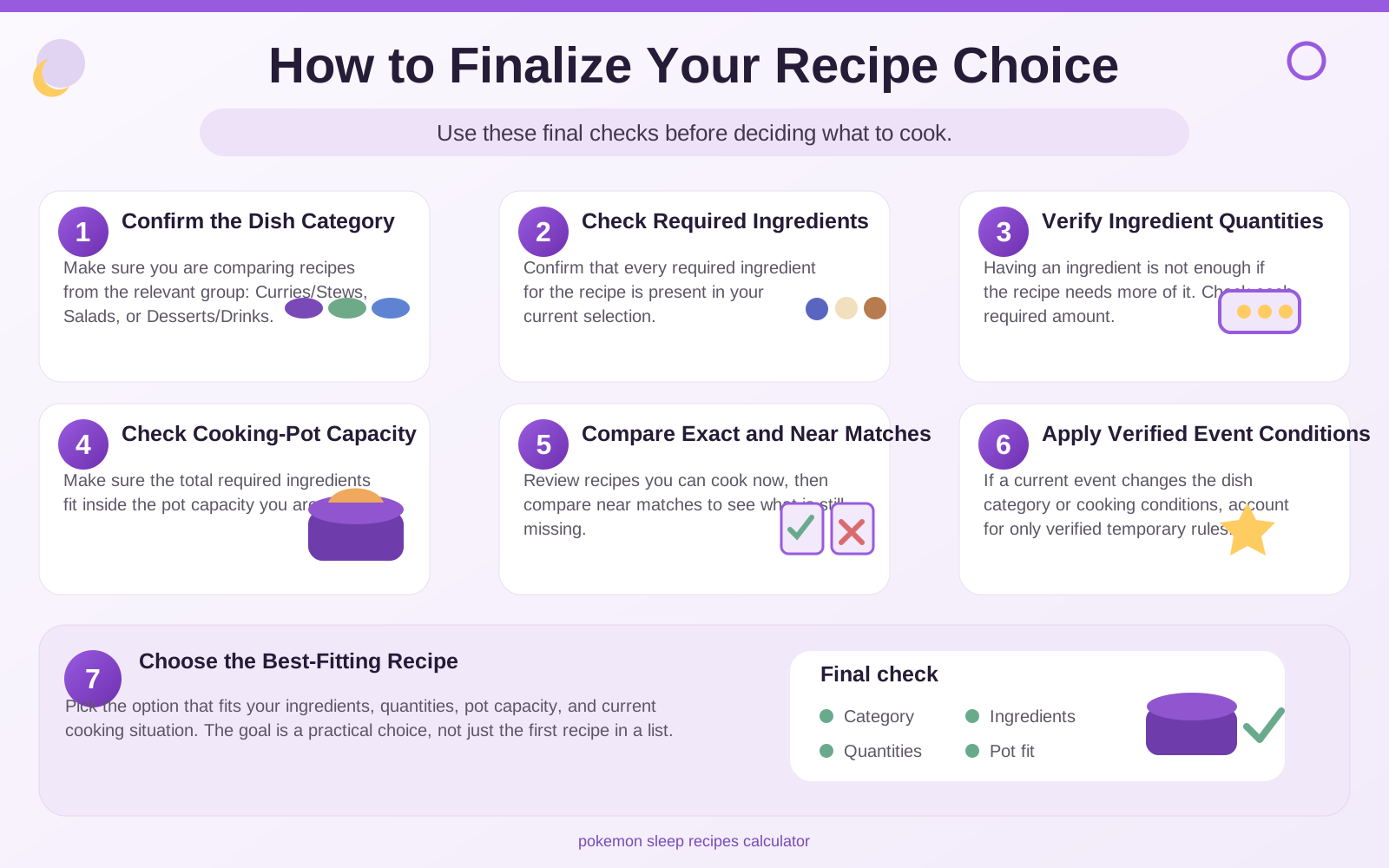
Select Curries/Stews, Salads, or Desserts/Drinks so the calculator compares recipes from the correct meal group.
Enter the ingredients currently available to you. Where quantity matters, the calculator will use the amount you enter rather than treating every ingredient as simply present or absent.
Use your current capacity so recipes that cannot physically fit are clearly separated from recipes you can cook now. Event or skill bonuses can change capacity, so this value should be adjustable.
Start with recipes that meet all requirements, then check near-matches to see exactly which ingredient or quantity is still missing.
Practical tip: re-check your selected pot size during cooking events or after a cooking-related skill activates. Official events can temporarily increase how many ingredients fit in the pot, so the best available recipe can change even when your ingredient inventory stays the same.
Once your category, ingredients, and pot size are set, run the recipe match. The calculator will compare your input with the recipe database and place the most relevant options first instead of making you scan a long list manually.
Read the result status before deciding what to cook. An exact match means the required recipe ingredients and quantities are covered by your current input. A near match will show what is missing, so you can decide whether to wait for more ingredients, change your helper team, or choose another dish that is already available.
Use the result details as a planning aid rather than only a recipe lookup. Each recipe view is intended to keep the important information together: required ingredients, quantities, total ingredient count, pot compatibility, and match status. That makes it easier to compare several realistic options before spending ingredients in-game.
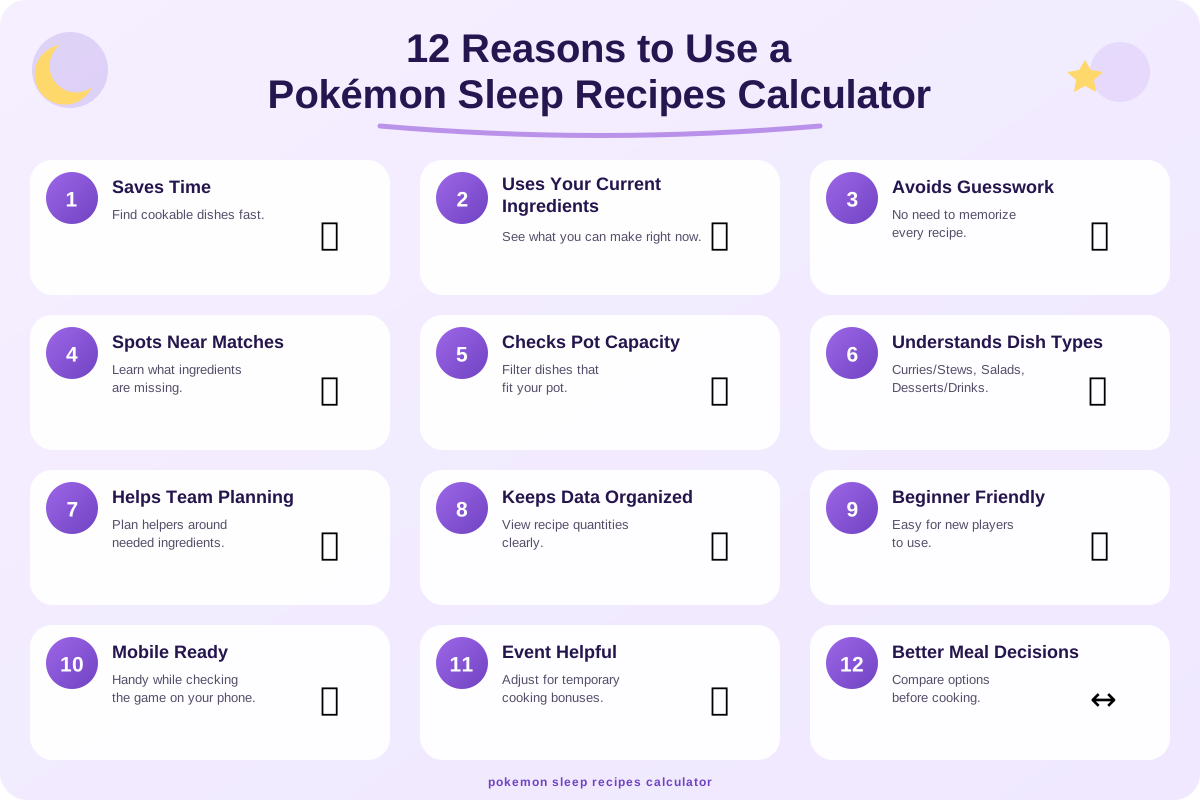
A static recipe list can tell you what exists. A useful calculator should help you decide what is realistic for your current ingredients, dish category, and cooking-pot capacity. These are the practical reasons we are building the tool around.
Instead of opening recipes one by one, you can narrow the list using the meal category, ingredients, and quantities you actually have. That turns a large recipe database into a smaller set of realistic choices.
Near-match results can show which ingredient is missing and how much more is needed. That is more useful than a simple yes-or-no match when you are deciding whether to wait, gather more, or cook something else.
A recipe may match your ingredient inventory but still require more ingredient slots than your current pot can hold. The calculator is designed to flag that difference before you plan around a recipe that does not fit.
Pokémon Sleep rotates between Curries/Stews, Salads, and Desserts/Drinks. Filtering by the active category prevents irrelevant recipes from getting in the way when you are planning a meal.
Exact matches answer what you can cook now. Near matches show the next-best possibilities and the remaining requirements, giving you more useful options than a single ranked recipe list.
Official events can lock the requested dish category, add new recipes, or apply temporary dish bonuses. Keeping category and event-sensitive data separate makes the calculator easier to update when those rules change.
Once you know which ingredients are blocking a recipe, you have a clearer target for ingredient gathering. The tool can help you focus your planning around specific shortages instead of guessing what to collect next.
Pokémon Sleep continues to add recipes and ingredients over time. A structured database is easier to maintain than scattered static charts, so new additions can be incorporated without rebuilding the whole experience.
The calculator is being designed for short checks while you are playing: choose a category, enter what you have, and review the useful matches without working through a long article or spreadsheet.
Research basis: official Pokémon Sleep announcements confirm that 2026 events have fixed requested dish categories, applied temporary dish Strength bonuses, and introduced new recipes; the Amber Canyon update also added a new ingredient and recipes across multiple dish groups. Summer Festival 2026, Spring Festival 2026, and Amber Canyon.
The calculator is being designed around transparent rules rather than a black-box answer. Each system handles a different part of the cooking decision, from checking whether a recipe is possible to explaining what is missing and whether the dish fits your current pot.
These checks decide which recipes belong in the result set before any ranking or recommendation is applied.
Limits results to Curries/Stews, Salads, or Desserts/Drinks so the calculator does not mix recipes from the wrong meal group.
Compares the recipe's required ingredient set with the ingredients you entered and marks recipes whose required types are fully covered.
Verifies that you have enough of each required ingredient. Having an ingredient listed is not treated as sufficient when the recipe needs a larger quantity.
Compares a recipe's required ingredient total with the pot capacity you select and flags recipes that need more room than is currently available.
These systems explain the difference between what you can cook now and what is close enough to become useful with a small change.
Calculates the exact ingredient types and quantities still needed for a near match instead of returning only a generic unavailable status.
Measures how much of a recipe's required ingredient list is already satisfied, helping near matches appear in a useful order.
Places realistic options side by side using factors such as match status, shortages, required quantity, and pot compatibility rather than relying on recipe name alone.
Converts recipe shortages into a clear ingredient target so you can see which ingredient types your future helper planning needs to support.
Pokémon Sleep's cooking environment changes through updates and events, so the calculator's data layer needs to remain separate from its matching logic.
Keeps temporary event rules separate from normal recipe requirements. This lets the tool account for changes such as a fixed dish category or temporary cooking-pot bonuses without rewriting the base recipe database.
Stores recipe and ingredient data independently from the interface so newly added ingredients, recipes, or cooking changes can be verified and updated without changing the calculator's core matching code.
Why the final two systems matter: official Pokémon Sleep announcements show that events can change requested dish categories, multiply dish Strength, and temporarily enlarge cooking-pot capacity, while updates continue to add new recipes and ingredients. Summer Festival 2026, Packed Portions Cooking Week Part 2, and Amber Canyon.
Instead of switching between recipe lists, ingredient notes, and separate calculations, our Pokémon Sleep Recipes Calculator is designed to bring twelve practical cooking tools into one workflow.
These twelve capabilities are: a Cookable Recipe Finder, Dish Category Filter, Ingredient Quantity Checker, Exact Recipe Matcher, Near-Match Finder, Missing Ingredient Calculator, Cooking-Pot Capacity Checker, Recipe Comparison Tool, Ingredient Coverage Calculator, Ingredient Target Planner, Event Cooking Mode, and Recipe Update Tracker.
The features are designed to work together. A recipe can look possible at first, but the calculator can also check whether you have enough of each required ingredient, whether it fits your selected pot, what you are still missing, and whether a verified event condition changes the cooking decision.
The goal is not simply to advertise twelve features. It is to give you one practical place to make a better-informed cooking decision using the ingredients, recipe requirements, pot capacity, and verified conditions that apply to you.
Each useful result is designed to explain why it appears: which required ingredients are covered, what is still missing, whether the quantities are sufficient, and whether the recipe fits the selected pot. That makes the output easier to verify and more useful for real planning.
Temporary event rules are kept separate from normal recipe requirements. This allows the calculator to account for things such as a fixed requested dish category, dish Strength bonuses, or a temporarily larger cooking pot without corrupting the standard recipe database.
Core matching logic is being structured so it can run quickly in the browser, work well on mobile, remain keyboard-friendly, and be updated independently when recipe data changes. The core calculator does not need an account to produce a result, and update-sensitive facts are kept separate so they can be reviewed against official sources.
The event-aware design is based on real Pokémon Sleep mechanics. Official announcements show that events can set the requested dishes to a specific category, multiply final dish Strength, and temporarily increase cooking pot capacity, while new recipes and ingredients continue to be added over time. Summer Festival 2026, Packed Portions Cooking Week Part 2, and Valentine’s Day 2026.
Pokémon Sleep cooking does not look exactly the same every week. Your useful recipe options can change with the requested dish category, the ingredients you have collected, your current cooking-pot capacity, and temporary event conditions.
On a normal week, the calculator is designed to help you compare your available ingredients with recipes from the relevant dish group. During certain events, the situation can change: official Pokémon Sleep events have fixed Snorlax's requested dishes to a specific category, multiplied final dish Strength, and temporarily increased cooking-pot capacity.
Updates can also introduce new recipes and ingredients. Because of that, the project keeps standard recipe data separate from temporary event modifiers. This lets us update verified game data without changing the core matching rules every time an event starts or new cooking content is added.
The practical goal: show you results that match the cooking conditions you actually select, while keeping permanent recipe requirements separate from temporary bonuses or event rules.
Official examples include Spring Festival 2026, which set requested dishes to Salads and multiplied final dish Strength by 1.5, and other cooking events that temporarily increased cooking-pot capacity. New recipes have also continued to be added during 2026. Spring Festival 2026, Packed Portions Cooking Week Part 2, and Summer Festival 2026.
The calculator is most useful when you have a specific cooking decision to make—not simply when you want to browse a recipe list. These examples show the practical situations the tool is being designed to support.
See which recipes match the ingredients you currently have. The calculator is designed to narrow the recipe list to realistic cooking options instead of making you check every dish manually.

When a recipe is almost possible, see which required ingredients or quantities are still missing. This makes near matches useful instead of simply showing an unavailable result.

Check whether a recipe's required ingredient total fits the cooking-pot capacity you enter. Recipes that need more room can be clearly separated from options that fit your current pot.

Compare suitable recipes using ingredient coverage, missing requirements, and pot compatibility. This helps you understand the differences between several realistic choices before deciding what to cook.

Use verified event conditions when they materially change cooking, such as the requested dish category or temporary cooking bonuses. Normal recipe requirements remain separate from temporary event rules.

Pokémon Sleep can add new recipes and ingredients through updates. Our recipe data is designed to be maintained separately so verified additions can be incorporated without rebuilding the calculator.

Turn a near-match recipe into a clearer gathering target by seeing which ingredients are holding it back. This can make future ingredient planning more focused and practical.

Filter recipes by Curries/Stews, Salads, or Desserts/Drinks so you are comparing dishes from the relevant cooking category rather than browsing unrelated recipes.

The interface is designed for short checks on smaller screens, letting you review ingredients, recipe matches, and important requirements without working through a large spreadsheet or long recipe list.

Bring recipe matching, missing ingredients, quantity checks, and pot compatibility together in one workflow. The goal is to give you enough context to make an informed cooking choice instead of relying on trial and error.

Clear answers about how the Pokémon Sleep Recipes Calculator is being designed to work and how it relates to the game's cooking system.
It is designed to compare the dish category, ingredients, quantities, and cooking-pot capacity you enter with structured recipe data. The goal is to show recipes that fit your current situation, plus useful near matches when you are missing something.
Pokémon Sleep uses three main cooking groups: Curries/Stews, Salads, and Desserts/Drinks. The calculator is designed to filter results by the relevant group so recipes from unrelated categories do not appear in the same decision set.
An exact match means the required ingredient types and quantities are satisfied by the input you provide. A near match is a recipe that is close but still lacks one or more required ingredients or quantities, which the tool is designed to identify clearly.
A recipe can match your ingredient list but still require more total ingredients than your current pot can hold. Pot capacity is therefore a separate eligibility check, and official Pokémon Sleep events can temporarily increase that capacity.
Yes—that is one of the core planned functions. For near matches, the calculator is designed to show the missing ingredient types and the remaining quantity needed rather than returning only an unavailable result.
Only verified event conditions should be used. Temporary rules such as a fixed dish category, dish Strength bonuses, or an enlarged cooking pot are kept separate from normal recipe requirements so event information can be added and removed without changing the base recipe data.
Recipe and ingredient data are being kept separate from the matching interface. That structure makes it easier to review official updates and add verified new content without rewriting the calculator's core logic.
No. The tool is designed to help with recipe eligibility and planning, not to guarantee the highest possible Strength in every situation. Actual in-game outcomes can also depend on factors outside a basic recipe match, including temporary bonuses and game mechanics that may change over time.
The core calculator is being designed to work without requiring an account. If we later add optional saved preferences or account-based features, those would be described separately instead of being implied as part of the basic recipe-matching tool.
Yes. The interface is being built responsively so ingredient entry, recipe results, and comparison details remain usable on smaller screens as well as desktop devices.
No. It is an independent planning aid. You should still use Pokémon Sleep itself as the final source for the current in-game state, especially when an update or event has recently changed cooking conditions.
Official Pokémon Sleep announcements confirm that event weeks can fix the requested dish category, multiply dish Strength, increase cooking-pot capacity, and add new recipes. Examples include Summer Festival 2026, Packed Portions Cooking Week Part 2, and Valentine's Day 2026.
You can compare recipes manually by opening a recipe list, checking the active dish category, comparing every required ingredient and quantity, and then confirming whether the recipe fits your current cooking pot. That approach works, but it becomes repetitive when several recipes are close matches.
The calculator is being designed to perform those same checks in a consistent order. It can narrow recipes by dish category, compare ingredient coverage, identify shortages, and separate recipes that do not fit the selected pot capacity. The result is not intended to replace your judgment—it is intended to make the comparison easier to inspect.
The main advantage is clarity: one workflow can show what fits now, what is nearly possible, and which requirement is preventing a recipe from matching.
Review How the Calculator Works