WEDDING DRINK PLANNING

Wedding Alcohol Calculator

Estimate beer, wine, and spirits for your reception using your guest count, drinking guest share, event length, serving pace, beverage mix, and planning buffer.

BEVERAGE MIX

Set the share of planned alcoholic servings.

100%
Wine planning unit5 servings per 750 mL bottle
Spirits planning unit16 × 1.5 fl oz servings per 750 mL bottle
Beer planning unit1 can or bottle per serving

HOW THE ESTIMATE WORKS

Plan the total first, then split it by drink type

The calculator estimates alcoholic servings from the number of guests expected to drink, the reception length, your average serving pace, and an optional buffer. It then divides that total across beer, wine, and spirits using the percentages you choose. For a spirits-only plan, use the liquor wedding calculator. A planning serving is not necessarily a US standard drink; alcohol strength and pour size matter.

What Is a Wedding Alcohol Calculator?

A Wedding Alcohol Calculator is a planning tool that turns your reception details into a clear estimate for beer, wine, and spirits. Instead of guessing from guest count alone, this calculator also uses the share of guests expected to drink, reception length, average serving pace, beverage mix, and an optional planning buffer.

The calculation starts with the number of drinking guests and the number of alcoholic servings you expect across the event. It then divides that total into beer, wine, and spirits using the percentages you choose. The result is shown as estimated beer cans or bottles, 750 mL wine bottles, and 750 mL spirits bottles.

This is a planning estimate, not a recommendation for how much anyone should drink. Your venue rules, caterer setup, guest preferences, non-alcoholic options, service style, and local requirements can all change what you ultimately need.

Here's what the calculator is designed to help you control:

  • Estimate from total guest count rather than a fixed wedding size
  • Adjust the percentage of guests expected to drink alcohol
  • Set the reception length in hours
  • Choose an average serving pace per drinking guest
  • Split the plan across beer, wine, and spirits
  • Add a planning buffer for extra stock
  • See the assumptions used for bottle and serving estimates
FeatureHow It Helps
Total guest countSets the starting size of the reception
Drinking guest percentageSeparates likely drinkers from the full guest list
Reception lengthLets the estimate scale with event duration
Drinks per guest per hourControls the serving-rate assumption
Beer / wine / spirits mixDistributes total servings by beverage type
Planning bufferAdds optional extra stock above the base estimate
Visible serving assumptionsShows how bottle counts are derived
Responsive calculator layoutWorks cleanly across desktop, tablet, and mobile screens

You can build the estimate around the parts of your reception that actually matter:

  • Guest count
  • Expected drinking share
  • Event duration
  • Serving pace
  • Beer percentage
  • Wine percentage
  • Spirits percentage
  • Extra planning buffer

The beverage mix must total 100%, which keeps the beer, wine, and spirits estimates tied to the same total serving plan rather than creating overlapping quantities.

How to Use the Wedding Alcohol Calculator

Using the calculator is straightforward. Enter the details you know, adjust the assumptions to match your reception, and calculate the plan.

Step-by-Step

  1. Enter your total guest countStart with the number of people expected at the reception.
  2. Set the drinking guest percentageEstimate what share of the guest list is likely to drink alcohol.
  3. Choose the reception lengthEnter how many hours alcohol service is expected to run.
  4. Set the serving paceChoose the average number of alcoholic drinks per drinking guest per hour.
  5. Adjust the beverage mixSplit the plan across beer, wine, and spirits. The three percentages must add up to 100%.
  6. Add a planning bufferUse the optional percentage to add extra stock above the base estimate.
  7. Click Calculate Wedding Alcohol PlanReview the estimated total servings and bottle or unit counts for each drink type.

You can change any input and recalculate as many times as needed. That makes it easy to compare a shorter reception, a different drink mix, or a smaller drinking guest percentage without rebuilding the plan from scratch.

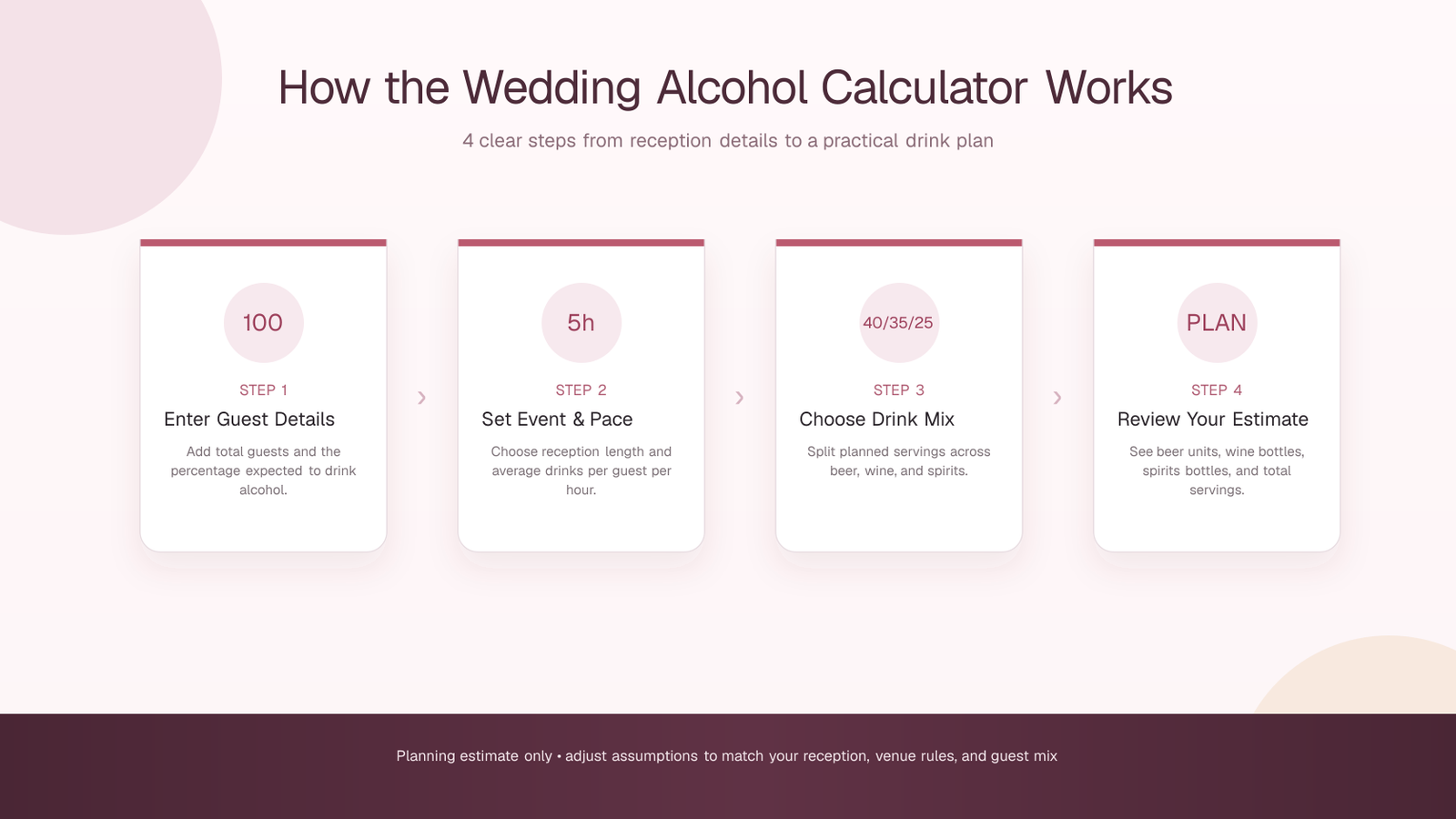
Four-step Wedding Alcohol Calculator visual showing guest details, event length and serving pace, beer wine and spirits mix, and the final drink estimate.

50 Wedding Alcohol Planning Checks

A useful wedding bar estimate depends on more than one number. These 50 checks help you review the assumptions around the calculator before you turn the result into a venue, caterer, or purchasing plan.

Below are 50 practical details worth confirming:

  1. Final guest count
  2. Drinking guest percentage
  3. Reception length
  4. Alcohol service window
  5. Drinks-per-hour assumption
  6. Beer percentage
  7. Wine percentage
  8. Spirits percentage
  9. Planning buffer
  10. Venue alcohol policy
  11. Caterer bar package
  12. Licensed bartender requirements
  13. Local alcohol-service rules
  14. Guests of legal drinking age
  15. Guests who do not drink alcohol
  16. Cocktail-hour timing
  17. Dinner service timing
  18. Last-call timing
  19. Beer can or bottle size
  20. Wine bottle size
  21. Spirits bottle size
  22. Standard spirit pour size
  23. Wine servings per bottle
  24. Spirit servings per bottle
  25. Sparkling-wine toast
  26. Signature cocktail service
  27. Beer-only bar option
  28. Beer-and-wine-only option
  29. Full-bar option
  30. Red and white wine split
  31. Beer style mix
  32. Spirits category mix
  33. Mixer quantities
  34. Non-alcoholic alternatives
  35. Water availability
  36. Ice requirements
  37. Glassware quantities
  38. Chilling or refrigeration space
  39. Outdoor weather conditions
  40. Wedding season
  41. Daytime or evening schedule
  42. Meal format
  43. Delivery timing
  44. Return policy for unopened stock
  45. Corkage or service fees
  46. Storage before service
  47. Transportation or driver planning
  48. Final RSVP changes
  49. Recalculate after vendor changes
  50. Keep assumptions with the final plan

The calculator handles the core serving estimate, but these checks help you decide whether the inputs match the reception you are actually planning. A guest-count change, shorter bar service, beer-and-wine-only menu, or venue restriction can all change the final plan even when the calculation itself is correct.

This checklist is especially useful when you are reviewing the estimate for:

  • Final venue or caterer discussions
  • Bar package comparisons
  • Reception inventory planning
  • Non-alcoholic drink planning
  • Storage, chilling, and service setup
  • Final RSVP and schedule updates

Keep the result as a planning estimate rather than a consumption target. The calculator does not know individual guest behavior, medical considerations, or venue-specific rules.

Wedding Alcohol Planning for Different Bar Styles

The same calculator can support different reception setups because the beer, wine, and spirits percentages are editable. The important part is keeping the three beverage shares at a combined 100%.

Beer & Wine Only

Set the spirits percentage to 0%, then divide the full 100% between beer and wine. The result will estimate beer units and wine bottles without adding a spirits bottle requirement.

Useful checks for this setup include:

  • Confirm the beer-to-wine split
  • Review red, white, or sparkling wine needs separately if required
  • Check the actual beer container size used by your venue or supplier
  • Keep non-alcoholic drinks outside the alcoholic serving split

Full Bar

Keep beer, wine, and spirits all above 0% and adjust the percentages to match the menu you plan to serve. The calculator then divides the same total serving estimate across all three categories.

Useful checks for this setup include:

  • Confirm that beer, wine, and spirits still total 100%
  • Review the 1.5 fl oz spirit-pour assumption against your service setup
  • Plan mixers, ice, glassware, and garnishes separately
  • Recalculate if the bar service window or guest count changes

Neither setup is automatically “better.” The calculator simply gives you a consistent way to model the bar format you have already chosen.

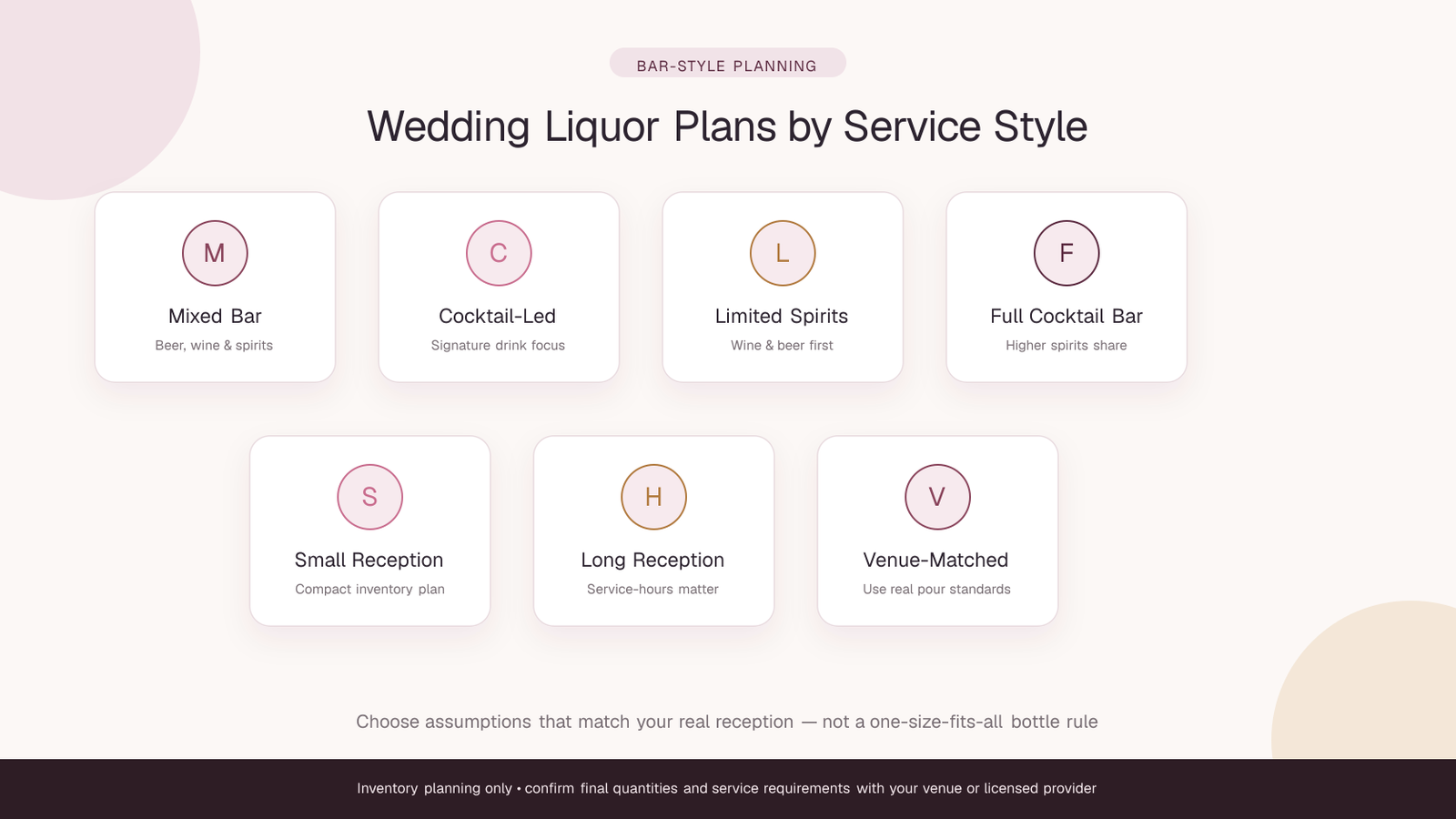
Seven wedding bar planning styles: mixed bar, cocktail-led, limited spirits, full cocktail bar, small reception, long reception, and venue-matched service.

Wedding Alcohol Calculator for Different Reception Settings

The calculator is not tied to one wedding format. You can use the same core inputs for a hotel ballroom, backyard reception, outdoor venue, destination wedding, brunch, or evening celebration. What changes is the assumption set you enter: guest count, drinking guest share, event length, serving pace, beverage mix, and planning buffer.

Venue rules and service arrangements still matter. The calculator estimates quantities, but your caterer, bartender, venue contract, local alcohol rules, storage space, and non-alcoholic drink plan determine how that estimate should be used in practice.

Hotel & Banquet Hall Receptions

For a hotel or banquet hall, start with the final invited or RSVP guest count and confirm how long the venue will actually serve alcohol. If the venue sells drinks as part of a package, compare the calculator's estimate with the package assumptions rather than treating either number as automatically correct.

  • Confirm bar opening and closing times
  • Check whether the package is beer-and-wine only or a full bar
  • Review corkage, service, and bartender fees separately
  • Ask whether unopened stock can be returned or credited

Backyard Weddings

Backyard receptions often require more hands-on planning because storage, ice, chilling, glassware, and serving staff may not be bundled into a venue package. The calculator can estimate the alcoholic servings, while you separately plan the equipment and logistics needed to serve them safely and legally.

Outdoor & Garden Weddings

Outdoor events can be affected by temperature, shade, refrigeration, and the distance between storage and service areas. A planning buffer may be useful for stock, but it should not be used to replace a realistic service-rate assumption. Recalculate if the event schedule changes.

Destination Weddings

For a destination wedding, use the calculator only after checking the venue's local serving rules and supplier options. Bottle sizes, package formats, return policies, and alcohol availability can differ by location, so confirm those details before turning the estimate into a purchasing list.

Brunch & Daytime Receptions

A shorter daytime reception may use a different serving pace or beverage mix than a long evening event. Adjust the event length and drink-rate assumption instead of reusing an evening estimate unchanged.

Evening Receptions

Evening receptions are often longer, so duration becomes especially important. Enter the actual alcohol-service window rather than the full time guests are on site if service does not run from arrival through departure.

Micro-Weddings & Small Receptions

For a smaller guest list, the same formula still works. The result may produce partial bottle requirements, so the calculator rounds wine and spirits to whole bottles for the displayed purchasing estimate.

Large Receptions & Other Formats

For larger weddings, accurate guest segmentation matters more because a small percentage change can move the final quantities noticeably. Re-run the calculator after major RSVP, schedule, or bar-menu changes instead of relying on an older estimate.
Wedding Bar Planning for Larger Guest Lists & Multi-Hour Receptions

When the guest list or service window grows, small assumptions can create a large difference in the final numbers. This is where an interactive calculator is most useful: you can adjust one variable at a time and immediately see how the beer, wine, spirits, and total serving estimates change.

Use the calculator to compare:

  • Different final RSVP totals
  • Shorter or longer alcohol-service windows
  • Different percentages of guests expected to drink
  • Beer-and-wine-only service versus a full bar
  • Lower or higher planning buffers
  • Alternative beer, wine, and spirits percentage splits

Keep mixers, soft drinks, water, ice, garnishes, glassware, staffing, transport, and venue fees outside the alcoholic serving count unless you are planning those items separately. They are important parts of a bar plan, but they are not the same unit as beer cans, wine bottles, or spirit bottles.

The calculator is designed for inventory planning. It does not predict individual consumption and should not be used as a target for how much guests ought to drink.

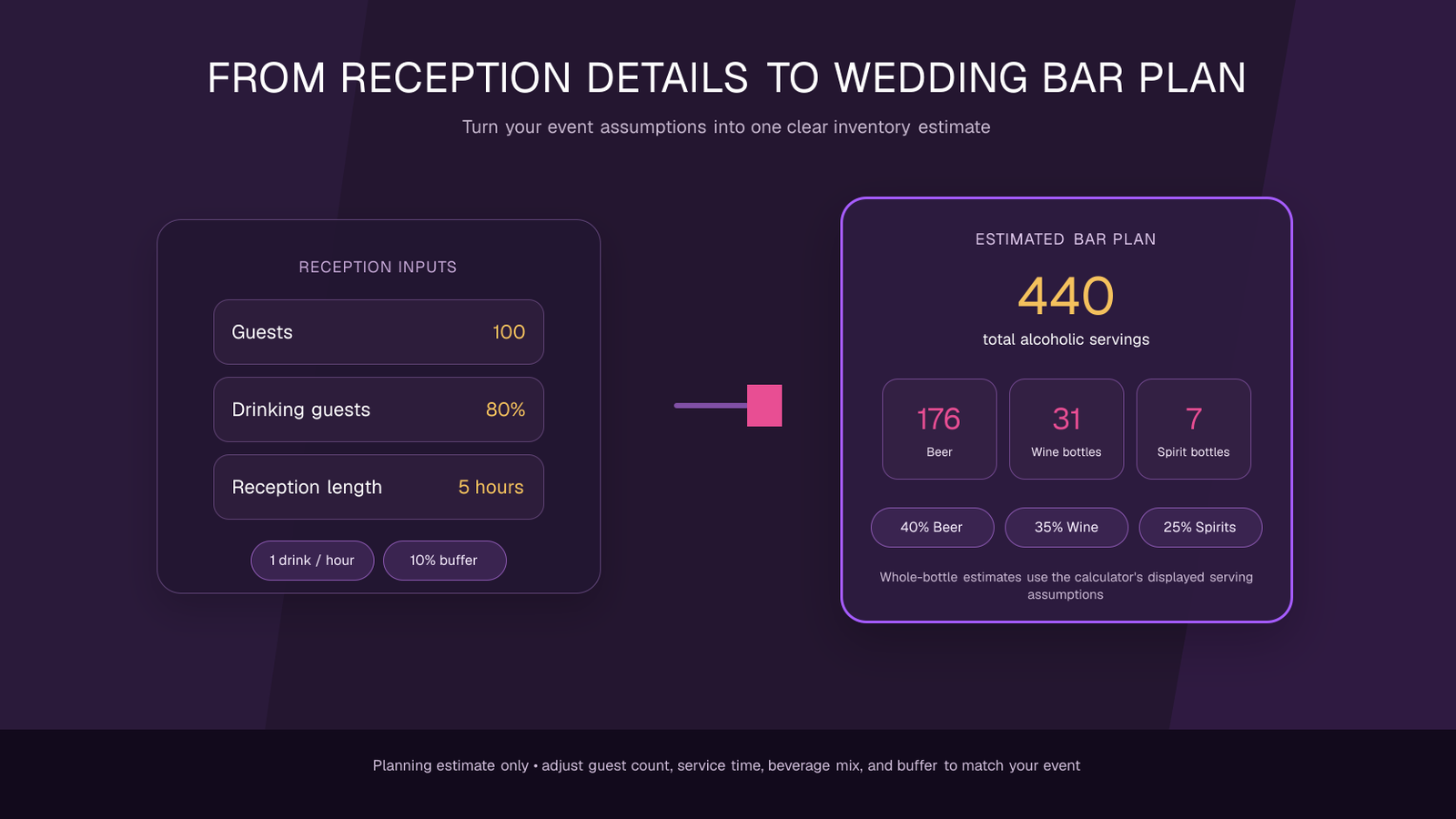
Wedding Alcohol Calculator example showing reception inputs for 100 guests, 80 percent drinking guests, a five-hour reception, one drink per hour, and a 10 percent buffer transformed into a planning estimate of 440 alcoholic servings, 176 beer units, 31 wine bottles, and 7 spirit bottles.

Why Wedding Planners Use a Drink Calculator

A wedding bar plan has several moving parts, and small changes can affect the final quantities. A calculator gives you one place to test those assumptions instead of rebuilding the arithmetic every time the guest count, schedule, or drink mix changes.

You gain:

  • A repeatable calculation based on the same assumptions each time
  • A clear split between beer, wine, and spirits
  • Faster re-planning after RSVP or schedule changes
  • Visible serving assumptions for bottle estimates
  • A simple way to compare bar formats before speaking with vendors

Built for Clear, Practical Planning

The calculator keeps the important inputs visible instead of hiding everything behind one final number. You can see the guest count, drinking guest percentage, reception length, drinks-per-hour assumption, beverage mix, and planning buffer that produced the result.

It helps you avoid:

  • Mixing US-style serving assumptions with a different venue package
  • Forgetting to update the plan after the guest list changes
  • Using a beer-and-wine estimate for a full-bar reception
  • Counting non-alcoholic drinks inside the alcohol mix percentages
  • Treating a rough planning estimate as an exact consumption forecast

Flexible Across Reception Formats

The same calculation can be adjusted for hotel weddings, backyard receptions, destination events, brunches, evening celebrations, micro-weddings, and larger guest lists. The tool does not automatically apply local alcohol rules or venue policies, so those should always be checked separately.

Tips for Getting a Better Estimate

  1. Use the final alcohol-service window, not automatically the full event length.
  2. Estimate the drinking guest percentage separately from the total guest count.
  3. Keep beer, wine, and spirits percentages at exactly 100% combined.
  4. Match the bottle and pour assumptions to your venue or caterer when they differ.
  5. Recalculate after meaningful RSVP, timing, or menu changes.
  6. Plan water and non-alcoholic choices separately from alcoholic servings.
  7. Keep the planning buffer modest and explain why you added it.
  8. Save the assumptions alongside the final quantity estimate.

Practical Ways to Use the Wedding Alcohol Calculator

The calculator is most useful as a planning and comparison tool. Instead of generating one number and stopping there, you can run several realistic scenarios and discuss the differences with your venue, caterer, bartender, or event planner.

Use it for:

  • Comparing a 4-hour reception with a 6-hour reception
  • Testing beer-and-wine-only versus full-bar service
  • Updating quantities after the final RSVP count
  • Comparing different beer / wine / spirits percentage mixes
  • Checking the impact of a smaller drinking guest percentage
  • Reviewing the effect of an optional stock buffer
  • Preparing a clear discussion point for a caterer or venue
  • Separating alcoholic inventory from mixers, water, ice, and glassware

Because every result comes from editable inputs, the tool is useful for scenario planning rather than pretending there is one universal quantity for every wedding.

Pro Tips: Build a Wedding Bar Plan That Holds Up

A useful result is one you can explain later. Keep the assumptions simple, document them, and update the plan when the event changes.

Focus on the core inputs

  • Final guest count
  • Drinking guest share
  • Alcohol-service duration
  • Serving-rate assumption
  • Beverage mix
  • Planning buffer

Avoid common planning mistakes

  • Using the invited count after RSVPs are final
  • Ignoring the venue's actual bar-service window
  • Letting beverage percentages total more or less than 100%
  • Forgetting bottle-size or pour-size differences
  • Mixing alcoholic and non-alcoholic inventory into one total
  • Assuming every guest will drink at the same rate

The goal is a transparent inventory estimate, not a target for guest consumption. Responsible service, non-alcoholic choices, local rules, and venue policies remain part of the real-world plan.

Wedding Alcohol Calculator Comparison Table

Here's a practical comparison between using this interactive calculator and building the estimate manually from scratch.

Planning FeatureWedding Alcohol CalculatorManual Estimate
Guest count inputEditableManual arithmetic
Drinking guest percentageBuilt inMust be calculated separately
Reception durationEditableMust be included manually
Serving-rate assumptionVisible and adjustableEasy to forget or mix with other assumptions
Beer / wine / spirits splitValidated to total 100%Requires separate calculations
Planning bufferOptional percentage inputAdded manually
Wine bottle estimateCalculated automaticallyManual conversion from servings
Spirits bottle estimateCalculated automaticallyManual conversion from servings
Scenario changesRecalculate after editing inputsRework the math each time
Assumptions shown on pageYesDepends on your notes

Both approaches can use the same underlying assumptions. The calculator mainly reduces repetitive arithmetic and keeps the inputs visible in one workflow.

Frequently Asked Questions

Clear answers about wedding bar estimates, guest assumptions, beer, wine, spirits, bottle counts, and how to use the calculator responsibly.

What is a Wedding Alcohol Calculator?

It is an inventory-planning tool that estimates alcoholic servings for a wedding reception from your guest count, expected drinking guest percentage, event length, serving-rate assumption, beverage mix, and optional planning buffer.

How does the Wedding Alcohol Calculator estimate quantities?

The calculator first estimates the number of guests expected to drink, multiplies that by the reception length and the drinks-per-hour assumption, then applies your optional buffer. It splits that total across beer, wine, and spirits using the percentages you enter.

Do the beer, wine, and spirits percentages need to total 100%?

Yes. The three beverage percentages must add up to 100% so every planned alcoholic serving is assigned to one category without overlap.

Can I use the calculator for a beer-and-wine-only wedding?

Yes. Set spirits to 0%, then divide the full 100% between beer and wine. The calculator will return beer and wine estimates without adding a spirits bottle requirement.

What does the drinking guest percentage mean?

It is your estimate of what share of the total guest list is expected to drink alcohol. It lets the calculator avoid treating every invited guest as an alcohol consumer.

What does the planning buffer do?

The buffer adds an optional percentage above the base serving estimate. It is an inventory-planning adjustment, not a recommendation for guests to drink more.

What bottle assumptions does the calculator use?

The current tool uses 5 servings per 750 mL wine bottle and16 servings of 1.5 US fl oz per 750 mL spirits bottle. Beer is planned as one can or bottle per beer serving. Check your venue or supplier if their container or pour sizes differ.

Does the calculator include mixers, water, ice, or non-alcoholic drinks?

No. Those items should be planned separately. The calculator estimates alcoholic servings and the resulting beer, wine, and spirits quantities only.

How accurate is a wedding alcohol calculator?

It is only as accurate as the assumptions you enter. Guest preferences, actual service pace, venue rules, weather, meal format, and schedule can all change real usage. Treat the result as a planning estimate and confirm final quantities with your venue, caterer, or licensed bar provider.

Should I use the full wedding duration or only bar-service time?

Use the actual alcohol-service window when possible. If the bar opens later than guest arrival or closes before the reception ends, using the full event duration can overstate the estimate.

Can I recalculate after my RSVP count changes?

Yes. Update the guest count or any other input and calculate again. Re-running the tool after major RSVP, schedule, or bar-menu changes is one of its main practical uses.

Will the Wedding Alcohol Calculator work on mobile devices?

Yes. The calculator and FAQ layout are designed to work across modern mobile, tablet, and desktop browsers, with responsive controls for smaller screens.

Do I need to install any software to use it?

No. The calculator runs directly in the browser, so there is no app or software installation required to calculate a wedding bar estimate.

Does the calculator replace venue rules or responsible-service requirements?

No. It is an inventory-planning tool only. Always follow local alcohol laws, venue policies, licensed-service requirements, and responsible-service practices, and make suitable non-alcoholic options available.

Start Planning Your Wedding Bar

Enter your guest count, drinking guest share, service length, beverage mix, and planning buffer, then review the resulting beer, wine, and spirits estimate. Adjust the inputs until they reflect the reception you are actually planning.

Open the Wedding Alcohol CalculatorInventory-planning tool only — confirm venue requirements, responsible-service rules, and final quantities with your venue, caterer, or licensed bar provider.